
Partners and connections
The partner is the central setting of NCS-EDI. It holds everything needed to exchange data with exactly one business partner: their identifiers, the transport channel and the syntax details of their messages. Every partner is linked to a SAP business partner.
What is this for?
- Maintain the partner identifiers (GLN, ID qualifier).
- Define the channel and the base path used for transmission.
- Describe the syntax of their messages – separators, character set, date format.
- Use test partner to run a partner in trial mode without producing real documents.
How to set it up
- Create the partner and link it to the business partner in SAP.
- Enter the identifiers the partner uses under GLN and ID qualifier.
- Choose the channel and provide the base path used for transmission.
- Set the message characteristics on the syntax tab: syntax version, separators (segment term., element sep., component sep.), release char, decimal mark, date format, encoding and whether a UNA segment is written.
- List the message types exchanged with this partner under messages.
- Define how duplicate incoming messages are handled via on duplicate.
- Start with test partner set, then switch the partner active.
Fields of the form
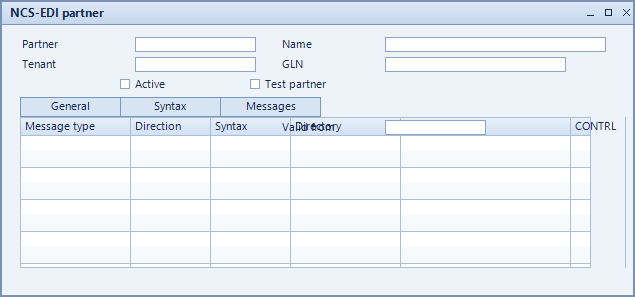
Captions taken from the "NCS-EDI partner" form (table @NCSEDI_PARTNER).
| Field | Meaning |
|---|---|
| Partner | Unique key of the partner. |
| Name | Name of the record. |
| Tenant | Tenant the partner belongs to. |
| GLN | Global location number of the partner. |
| Active | Enables the record. Only active records are evaluated. |
| Test partner | Trial mode – messages are processed but not posted productively. |
| General | Tab holding the partner master data. |
| Syntax | Tab holding the syntax characteristics of the messages. |
| Messages | Tab listing the agreed message types. |
| ID qualifier | Type of identifier the partner uses. |
| Business partner | Linked business partner in SAP Business One. |
| Channel | Transport channel, such as AS2, SFTP or a monitored folder. |
| Base path | Base directory for the exchange with this partner. |
| On duplicate | Behaviour when a message arrives twice. |
| Character set | Character set of the messages. |
| Syntax version | Version of the EDIFACT syntax in use. |
| Segment term. | Character terminating a segment. |
| Element sep. | Separator between data elements. |
| Component sep. | Separator inside a data element. |
| Release char | Release character allowing separators to be sent as text. |
| Decimal mark | Decimal mark used in numeric values. |
| Date format | Format of date values. |
| Encoding | Encoding of the file. |
| Write UNA | Writes the UNA segment with the separators at the start of the message. |
| Valid from |